
Administrator Dashboard User Guide
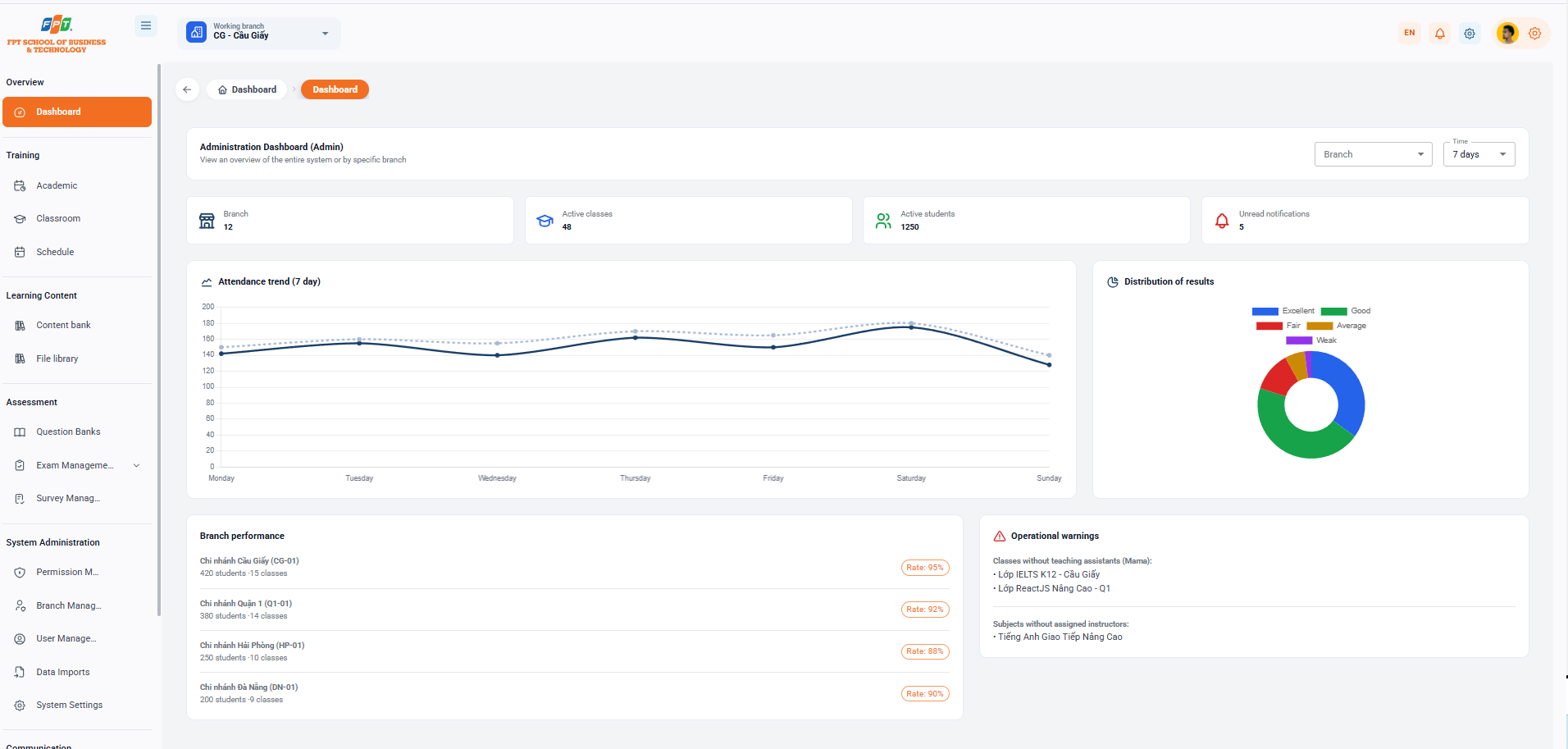
The Admin Control Panel screen provides a comprehensive overview of the entire operating system or detailed information per branch.
1.1. Dashboard Filters
- Breadcrumb: General > General.
- Functional description: View the overall system or individual branches.
- The filter is upgraded:
- Branch reading: Select a specific branch or select All branches from the drop down menu Branch.
- Time Location: Select the time mark to track the report data through the Time cell (e.g. 7 days, 30 days...).
1.2. Key Performance Indicator Cards
Area displays the core operating parameters in real time of the system:
- Branches: Total number of branches in the system (e.g. 12).
- Class in operation: Total number of classes in operation (e.g. 48).
- Students currently studying: Total number of students currently studying (e.g. 1250).
- Unread notifications: The number of notifications of the new system that have not been processed (e.g. 5).
1.3. Data Analysis and Visualization Charts
1.3.1. Attendance Trends (Seven Days)
- Chart form: Line chart.
- Tracking score: A pattern of fluctuations in the number of students attending classes and daily score during the week (Monday to Sunday), which helps the manager detect irregularities early in the score.
1.3.2. Result Distribution
- Chart form: Round-sectioned chart (Donut Chart).
- Ratio statistics: The classification and grading ratios of academic students throughout the system:
- The color is blue.
- Q: Green.
- The color is red.
- Average: Yellow.
- The color purple.
1.4. Branch Performance and Operational Alerts
1.4.1. Branch performance
Displays a detailed statistical list of the scale and activity rates of each branch:
- CG-01: 420 students in 15 classes. The ratio is 95%.
- District 1: 380 students in 14th grade.
- HP-01: 250 students in 10th grade. The ratio is 88 percent.
- Danang branch: 200 students to 9th grade.
1.4.2. Operating Alerts
List of cases to be dealt with immediately to ensure quality of training:
- Classes Without an Assigned Mama:
- IELTS K12 - The paper
- ReactJS Class High-up - Q1
- Unclassified teaching Instructor:
- English is upgraded