
Student Dashboard
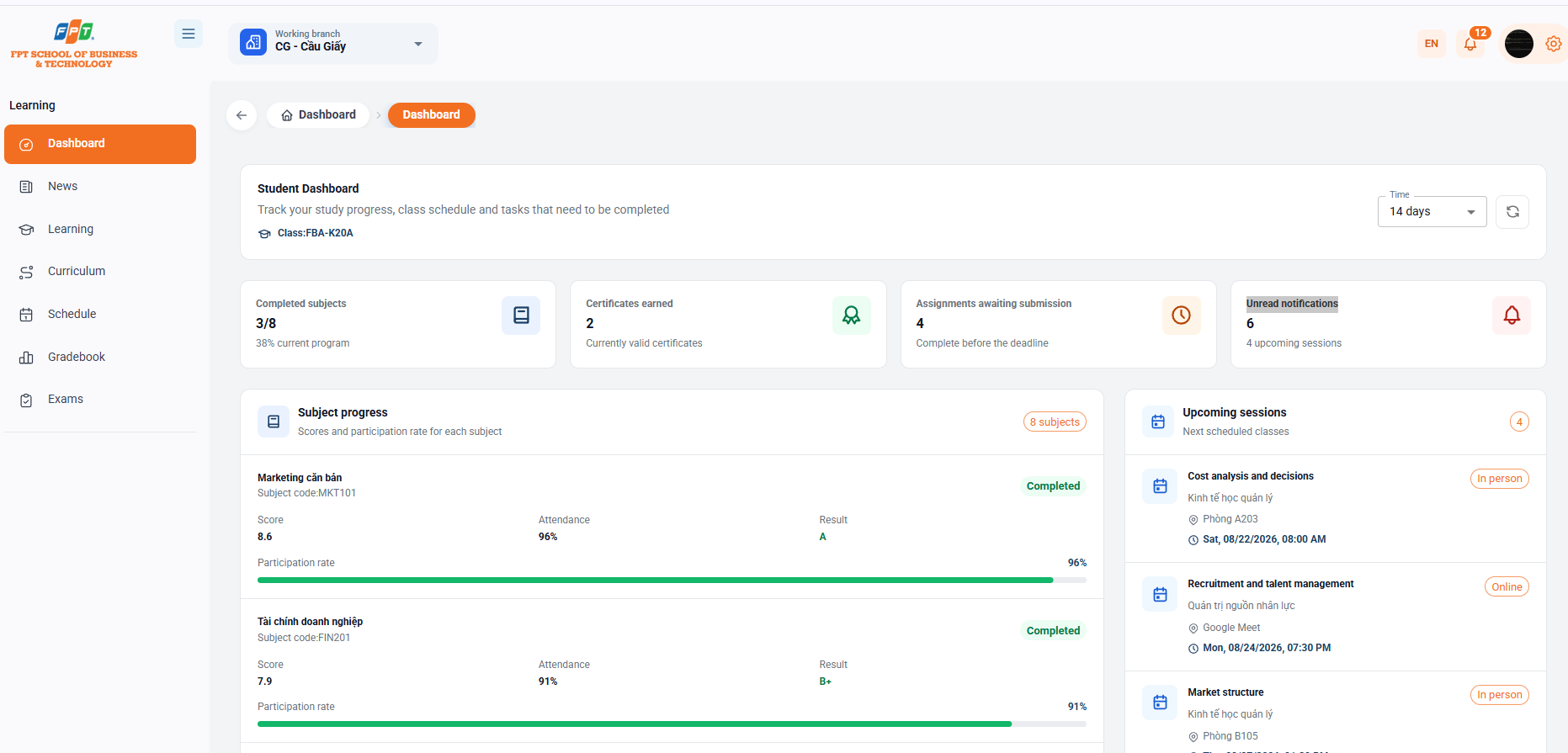
1. Overview
The Dashboard allows the student to easily track their entire academic progress, upcoming academic calendar as well as the tasks/practices to complete in real time.
2. Main Toolbar and Filter Functions
- Select a working branch: Students can switch between the branches where they study (for example, CG - Cau Giay).
- The time filter:
- Customize the period of time for displaying statistical data on the Dashboard (allowing selection: 7 days, 14 days, 30 days, 90 days).
- The Refresh button helps to update the latest data.
3. Summary Statistics
The system provides four quick indicator cards to help students grasp the learning situation:
- Completed subjects.
- Displays the number of subjects completed over the total number of subjects in the program (e.g. 3/8 subjects - reaching 38% of the program).
- Certificates earned:
- Statistics of the total number of certificates in existence and in force (e.g. 2 certificates).
- Assignments awaiting submission:
- Memorize upcoming exercises/exposures that need to be submitted on time (e.g. 4 exercises).
- Unread notifications:
- Summary of news, new announcements from the center/campus that have not yet been opened (e.g. 6 announcements).
4. Subject Progress Details
This area shows details of the scores, qualifications and status of each subject:
- Subject name & code: Quick identification support (e.g. Basic Marketing - MKT101, Corporate Finance - FIN201).
- Scores & Results:
- Updated grade point average (e.g. 8.6, 7.9).
- Displays the letter grade for the academic result (for example, A or B+).
- Score (participation rate):
- Statistical percentage of the number of sessions attended (e.g. 96%, 91%).
- The visual progress rate represents the completion rate.
- Academic status: Graduated or Enrolled.
5. Class Schedule and Upcoming Sessions
The list shows the following sessions in the most recent chronological order:
- Learning format: A clear distinction is made between Live (in the classroom) and Online (like Google Meet/Zoom).
- Details of each lesson:
- Lesson name/Themes: Examples: Cost and decision analysis, Recruitment and management of talent, Market structure.
- The name of the subject: For example, managerial economics, human resource management.
- Location/Learning Link: Actual classroom number (e.g. Room A203, Room B105) or online learning platform (Google Meet).
- School timings: Start date and time specified (e.g. 08:00 on Friday, August 15, 2026)