
Class and Teaching Schedule Management User Guide
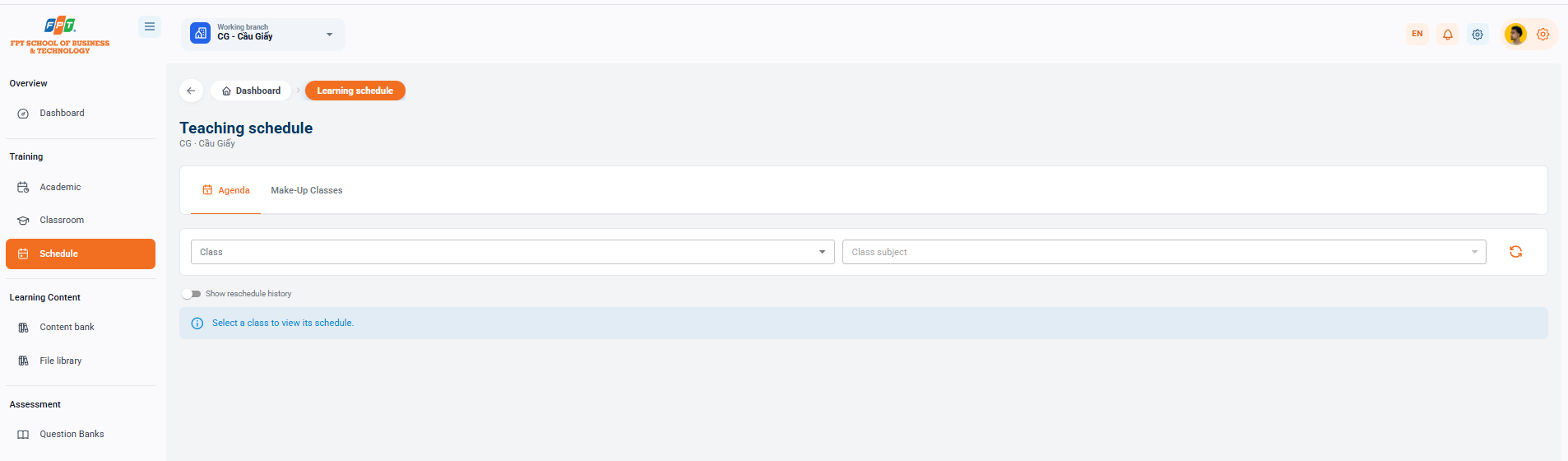
The Class Schedule module lets administrators and instructors search teaching schedules, monitor make-up sessions, and review schedule-change history at a branch.
4.1. Teaching Schedule Interface Overview
- Breadcrumb: General > Calendar.
- Title of the system: Curriculum (applies to the work branch, e.g. CG - Cau Giay).
- The main function tabs:
- Week schedule: Displays the timing of the detailed teaching curriculum by week of class/learning.
- Makeup class: Manage and monitor the classroom makeup sessions that are scheduled separately for the classes.
4.2. Class Schedule Filters and Search
To investigate the timeline, the administrator uses the following filtering tools:
- Administrative class: A drop-down list that allows you to select an administrative class that needs to see the calendar time (e.g. L2026A, H2026...).
- Curriculum: A drop-down list of curriculum-based support filters for each specific subject within the training program.
- Update button (Arc icon): Download the latest calendar data after the filter is set.
- "History now moved" button: Turn on/off the button to view the songs that have been postponed, rescheduled or changed from the original calendar time. Note: The system will display a Select class instruction notification to view the calendar. when the user has not selected the administrative class information in the filter.
The following is a partial guide to the Lesson repository compiled following the standard distributed title format for Google Docs: