
Lesson Repository Management User Guide
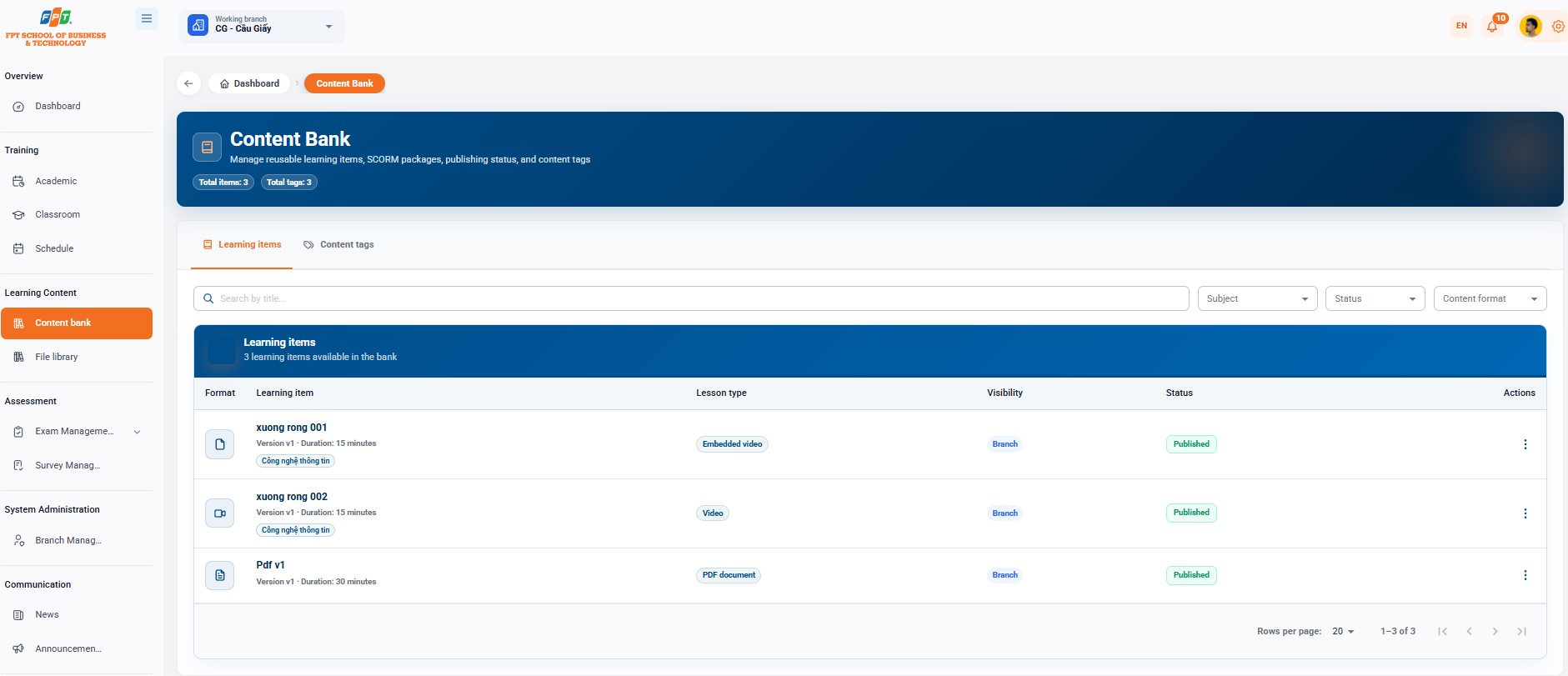
The Lesson repository system allows administrators and faculty to manage the entire recycled learning learning materials, SCORM-packaged lectures, publishing status, and content tag system of the branch.
5.1. Interface Overview and Quick Statistics
- Breadcrumb: General > Content store.
- General statistics:
- Overview: Total number of studies created in the warehouse (e.g. 3).
- Total tags: Total number of content classification tags being applied (e.g. 3).
5.2. Managing Learning learning materials
5.2.1. Filters and Search
- Search: Enter the keyword in the Search box by title....
- For the study of theology: Select a specific subject from the list of theology.
- By Status: Select the state (Published, Copy, etc.) from the Status cell.
- By Formatting: By formatting the types of archived formats from the formatting cell.
5.2.2. Learning learning materials Data Table
The table shows a list of all available learning learning materials (e.g. 3 available learning learning materials in banking):
- Format: The icon that represents the file type/lesson format.
- The content of the learning learning materials:
- The name of the learning materials (e.g. ship 001, ship 002, Pdf v1).
- Version information & time (e.g. Version v1 - Time: 15 minutes, 30 minutes).
- The subject/branch label is attached (e.g. Information Technology).
- Type of lesson: Classify the lecture format (e.g. Embedded Video, Video, PDF Document).
- Scope: Level of data sharing (e.g. branch).
- Status: Published status.
5.2.3. Learning learning materials Actions
Click on the [Three-Dot] icon at the end of each lesson to perform the operations:
- Previous: View the display of the learning learning materials under the student interface.
- Correction: Correction of information, content, or duration of the lesson.
- Create a replica of the spark: Copy the current spark into a new one.
- Published: To bring the learning materials into the formal system for inclusion in the curriculum.
- Chemical learning materials: Chemical learning materials from the Lesson repository.
5.3. Content Tag Management
Assistance in the creation and management of new tags helps to systematically classify learning learning materials by topic, discipline or skill.