
Question Bank Teacher Guide
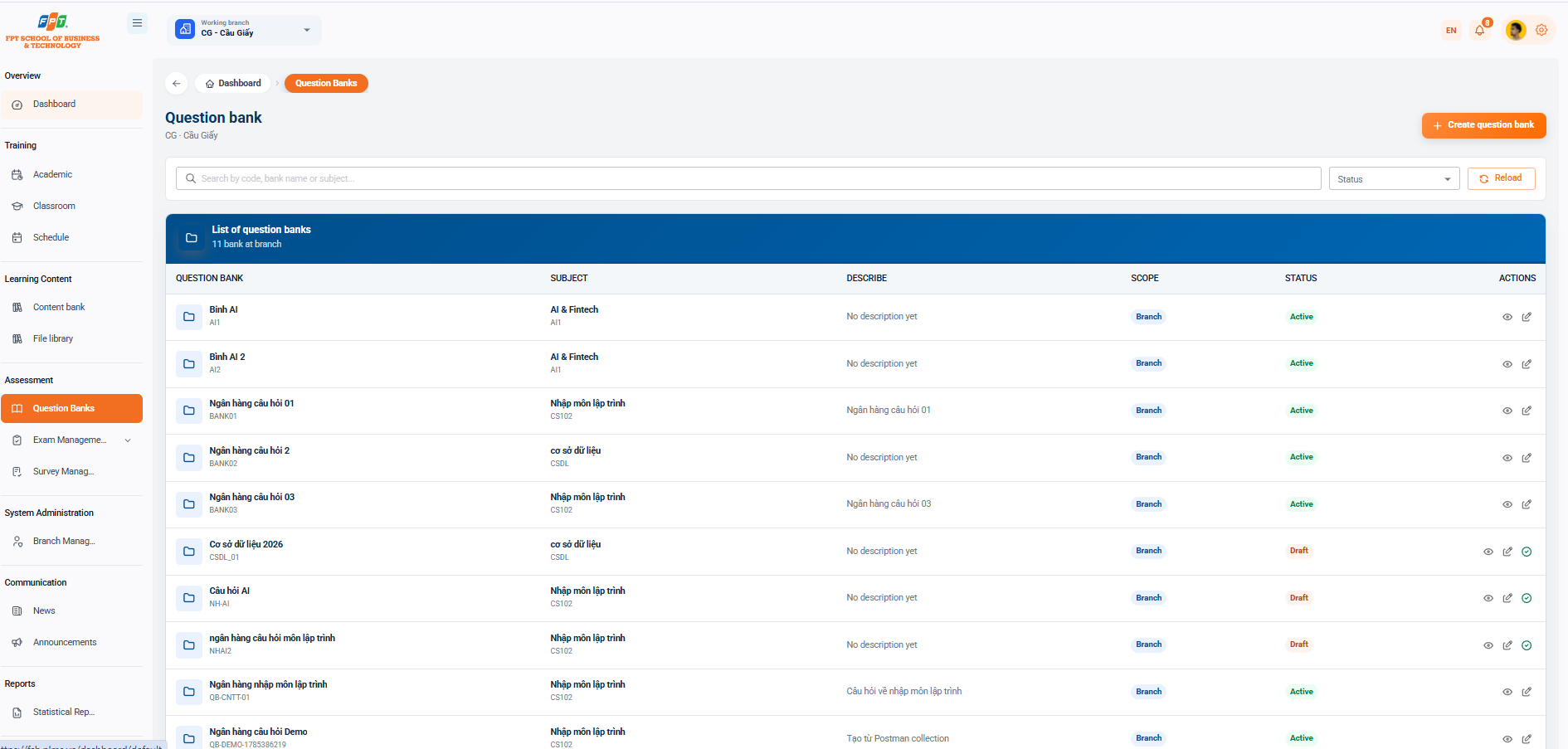
The Question bank system under the Assessment and Assessment category supports new faculty and staff to create, store, classify and manage the question banks by subject for the examination and assessment work at the branch.
7.1. Interface Overview
- Breadcrumb: General > Question bank.
- Title of the branch: Question bank.
- Table statistics: Indicates the number of branches (e.g. 10 branches).
- Search & Filter:
- Search by code, bank name or subject...
- The status filter and the [Return] button.
7.2. Question Bank List
Detailed management table list of existing question banks in the system:
| Question Bank | Subjects | Describe | The scope | The State | The work |
|---|---|---|---|---|---|
| The AI (AI) | AI & Fintech (AI) | Not yet described. | Branches | Active | 👁️ ✏️ |
| Question bank one (BANK01) | Get into programming (CS100) | Question bank one | Branches | Active | 🔗 ✏️ |
| Question bank two (BANK02) | The database (CSDL) | Not yet described. | Branches | Active | 🔗 ✏️ |
| Question bank three (BANK03) | Get into programming (CS100) | Question bank three | Branches | Active | 🔗 ✏️ |
| The database is 2026. (CSDL_01) | The database (CSDL) | Not yet described. | Branches | Draft | 👁️ ✏️ 🗑️ |
| What is the question? (NH-AI) | Get into programming (CS100) | Not yet described. | Branches | Draft | 👁️ ✏️ 🗑️ |
| Question bank programming (NHA2) | Get into programming (CS100) | Not yet described. | Branches | Draft | 👁️ ✏️ 🗑️ |
| Banking entrance programming (CB-CNTT-01) | Get into programming (CS100) | Question about programming entrance | Branches | Active | 👁️ ✏️ |
| Question bank Demo (CB.DEMO.1765286219) | Get into programming (CS100) | Created from the Postman collection | Branches | Active | 👁️ ✏️ |
| Question bank for programming (CB-NH-001) | Get into programming (CS100) | Not yet described. | Branches | Active | 👁️ ✏️ |
7.3. Creating a Question Bank
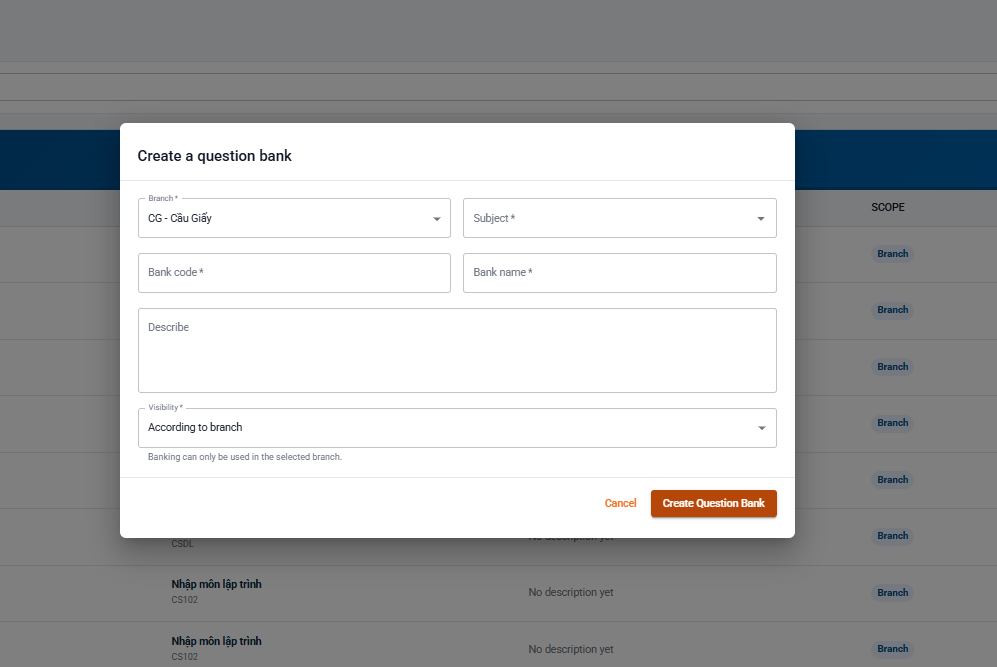
Click the [+ Create bank] button (orange) in the top right corner of the screen to open the startup form.
Configuration Fields
- Branch (*): Select the branch of work (default: CG - Cau Giay).
- Lessons (*): Select the question bank applied from the list.
- Bank code (*): Enter the unique identifier code for the bank (e.g. BANK01, CSDL_01).
- Bank name (*): Enter the name of the question bank.
- Description: Enter details of the scope or note the contents of the question.
- Display range (*): Select share scale (default: By branch - Bank only used in selected branch).
- Click [Create Bank] to complete or [Cancele] to close the form.
7.4. Question Bank Management Actions
- Eye icon (👁️): Access bank details to view, add new, edit or manage the list of internal questions.
- The Butt Chi symbol (️): Modifies the configuration information of the question bank.
- Link/Action icon (/️): Perform link attachment or delete question bank (for banks in the Link state). The following is a section of the Guide to Exam Management (Quality and Assessment) documentation compiled following the standard title format for Google Docs: