
Gradebook
16. Gradebook Page
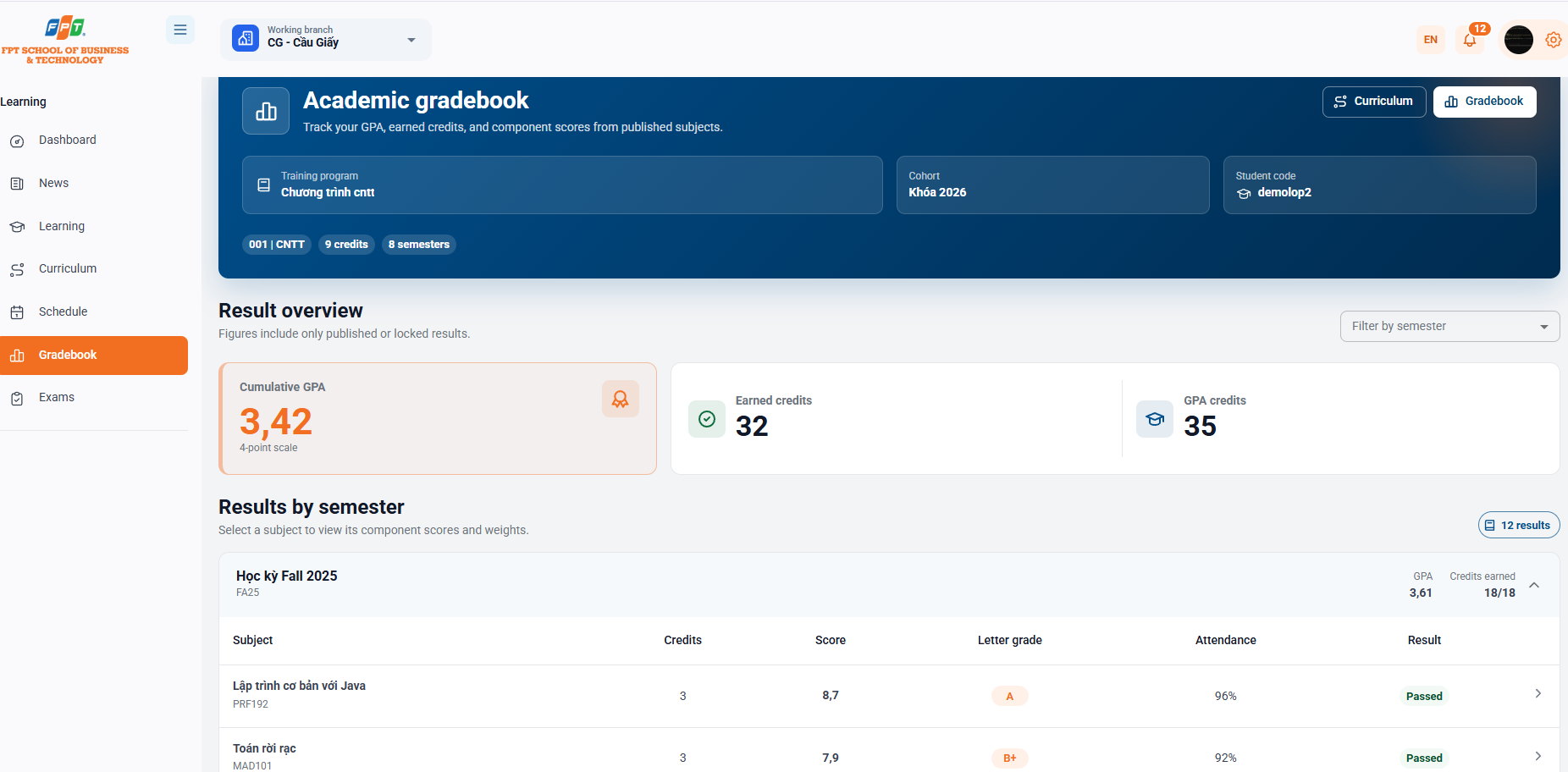
The Scoreboard system allows students to track the cumulative grade point average (GPA), total credits earned as well as the detailed assessment results of each subject by published semesters.
16.1. Program and Student Information Banner
- Identification of the person:
- Training program: Name of the official academic discipline (e.g. cntt program).
- Course: The corresponding key dates (e.g. 2026 key).
- Student code: The system's student identifier code (e.g. demolop2).
- The overall badges are: Industry code (001), total program credits (nine credits) and semester number (eight).
- Quick switch button: Click to switch back and forth between [Create Mode] and [Score].
16.2. Result Summary
The system displays the core academic assessment indicators (Numbers only include published results or key points):
- Accumulated GPA: The current accumulated average score of students is calculated on a scale of 4 (e.g. 3.42 - Score 4).
- Accumulated credits: Total number of credits students have earned and passed (e.g. 32).
- Credit only counts GPA: The total number of credits of subjects that have official scores used to calculate GPA (e.g. 35).
- Semesterly Filter: The drop down menu Semesterly helps the student quickly see the results of a particular semester separately.
16.3. Academic Results by Semester
The list of grades is clearly grouped by semester (e.g. Fall 2025 - FA25):
- The period summary statistics:
- Period GPA: Average score of that semester alone (e.g. GPA 3.61).
- Credit score: The number of credits earned over the total number of credits registered during the period (e.g. 18/18).
- Table of topics:
- Curriculum: The subject name and the subject code below (e.g. Basic Programming with Java - PRF192, Discrete Mathematics - MAD101).
- Credit score: The number of credits of the subject (e.g. 3).
- Scores: The total score is calculated on a scale of 10 (e.g. 8,7,7,9).
- Score: Class the academic results on a letter-scale (e.g. A, B+).
- Requirements: Attendance rate in class (e.g. 90%, 92%).
- Results: Status of academic assessment (Acquired or Not Achieved).
- Interaction: Click on the line of any subject (symbol >) to expand to see the details of the components (special points, interim points, assignment points, final exam points, etc.).