
Class Schedule
14. Class Schedule Page
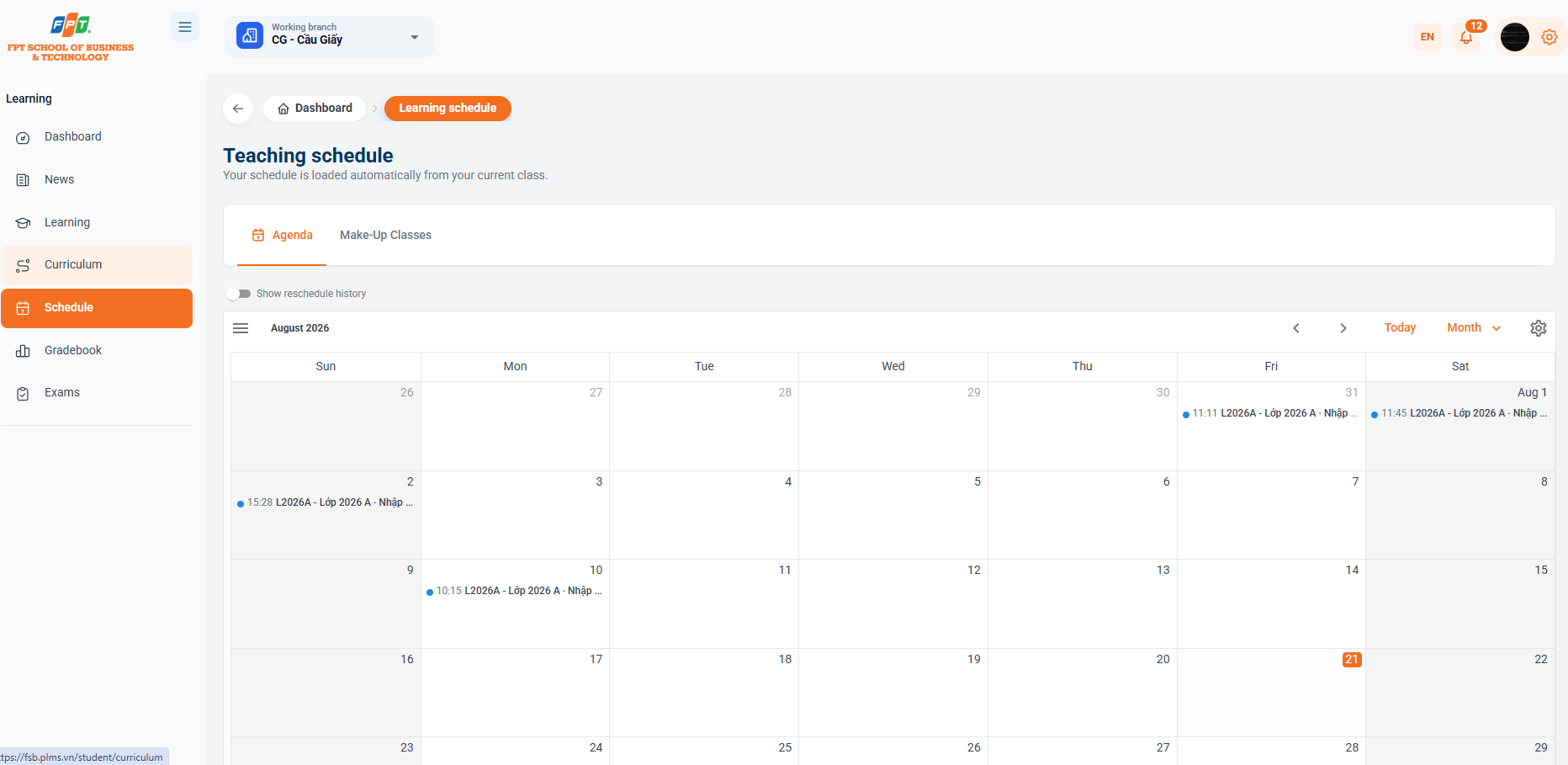
The Calendar Division allows the trainer to track the entire learning schedule, the core class sessions as well as the class makeup schedule that is automatically synchronized with the current class.
14.1. Schedule Categories and Display Filters
- Switch the calendar tab:
- Weekly/Monthly Calendar: Follow the key schedule.
- Makeup class: Manage the makeup class sessions on a self-scheduled basis.
- "Now History Shifted" button: Enable on/off display of previously changed or shifted classes.
- Time-tracking:
- [Today]: Fast forward to the current date mark (current day marked in orange highlight, e.g. day 14).
- Changing mode of viewing: The active spirit changes mode of viewing (Monday, Week, Day).
- Month Shift $[<]$$[>]$: Shift to view the calendar of previous or next months.
14.2. Calendar Grid View
- Full weekdays from Tuesday to Sunday.
- Display the class in the daylight saving time:
- The time for the study to begin. (For example, 11:11, 11:45, 10:15)
- Class code & corresponding subject name (e.g. L2026A - Class 2026 A - Enter...).
- Click directly on any of the class events on the calendar to open the spreadsheet.
15. Class Session Details
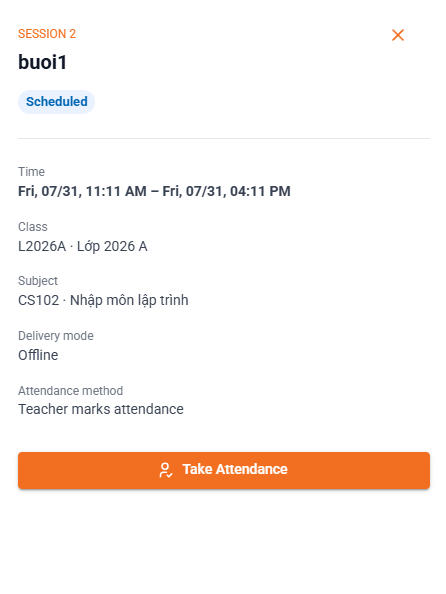
When clicking on any session on the calendar interface, the system opens the Drawer/Modal information box in the right corner of the screen.
15.1. General Session Information
- Session sequence number & Name: Indicate the location of the session in the process (e.g. BUI 2 - buoi1).
- Status of the class:
- Scheduled (blue label): The session has been recorded and scheduled by the system.
15.2. Session Details
- Time: Start and end times are exactly the same as school days (e.g., 11:11 on July 6, 31; 16:11 on July 6, 31).
- Class: Class code and class name registered (e.g. L2026A · Class 2026 A).
- Curriculum: Curriculum code and full curriculum name (e.g. CS102 · Enter programming).
- Form: Defines the form Direct (in class) or Online (online).
- The method of accreditation: The method of accreditation required (e.g. Instructor accreditation or Student self-accreditation).
15.3. Attendance Actions
- Note [$\boldsymbol{\circ^{\circ}}$ Age Score]: Allow the student to perform quick score operations directly on the system when the class is in session (or at the instructor's request).