
User Management User Guide
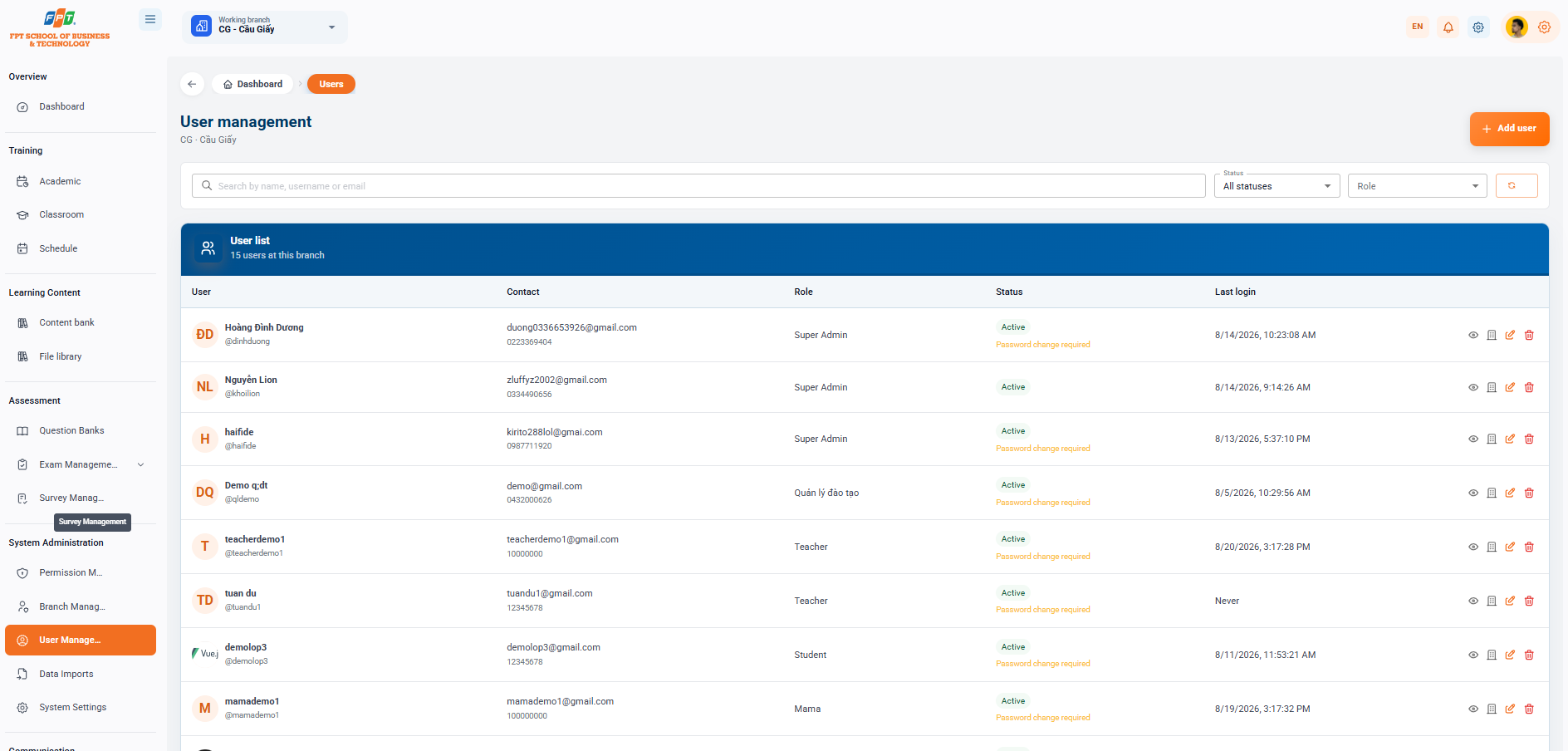
The User Management System in the System Management category supports administrator to create accounts, delegate roles, manage password status, and track the log-in history of staff/students at the branch.
12.1. User Management Overview and Filters
- Breadcrumb: Overview > Users
- System headings: User management (applies to the work branch, e.g. CG - Cau Giay).
- Functional button: Click the [+ Add user] button (orange) in the top right corner to start a new account.
- The search filter:
- Search: Search the account in the cell Find their name, username or email.
- Status tracking: Follow the account status through the All Status menu.
- Role reading: Read the account by job decentralization through the Role menu.
- Download button: Click the arc icon to update the list.
12.2. User List
Detailed management table of user accounts at the branch (now 13 users at the branch):
| Users | The contact | The role | The State | Last time you signed in. | The work |
|---|---|---|---|---|---|
| The King of the Jung (username: gddimduong) | duong0336652926@gmail.com 0336652926 | Super Admin | Active (Requires a change of password) | 10:23:08 14/8/2026 | Watch / Change roles / Reset MK / Remove |
| The Lion King (username: gklion) | zluffy2002@gmail.com 0334499059 | Super Admin | Active | 09:14:26 14/8/2026 | Watch / Change roles / Reset MK / Remove |
| ha11de1 (username: gha11de) | kirito2881@gmail.com 0987711120 | Super Admin | Active (Requires a change of password) | 17:37:10 13/8/2026 | Watch / Change roles / Reset MK / Remove |
| Demo qldt (username: gqldemo) | demo@gmail.com 0432000025 | Training management | Active (Requires a change of password) | 10:29:56 5/6/2026 | Watch / Change roles / Reset MK / Remove |
| teacherdemo1 (username: gteacherdemo1) | teacherdemo1@gmail.com 160006000 | Teacher | Active (Requires a change of password) | 16:42:44 14/8/2026 | Watch / Change roles / Reset MK / Remove |
| tuan du (username: gtsandu1) | tuandu1@gmail.com 12345678 | Teacher | Active (Requires a change of password) | I never did. | Watch / Change roles / Reset MK / Remove |
| demolop3 (username: gdemolop3) | demolop3@gmail.com 12345678 | Student | Active (Requires a change of password) | 11:53:21 11/8/2026 | Watch / Change roles / Reset MK / Remove |
| mamademo1 (username: gmamademo1) | mamademo1@gmail.com 160006000 | Mama | Active (Requires a change of password) | 15:17:32 19/8/2026 | Watch / Change roles / Reset MK / Remove |
| demolop2 (username: gdemolop2) | demolop2@gmail.com 12345678 | Student | Active | 15:17:22 19/8/2026 | Watch / Change roles / Reset MK / Remove |
12.3. Account Management Actions
- Eye icon (See detail): Access to see details of the user's personal information and activity history.
- Role-sharing: Updating the role for an account in the system.
- Key/Password icon (MK Reset): Re-paste a new password or send a password change request to the user.
- Trash (Remove) icon: Remove or disable user accounts from the branch system. The following is a document section of the Guide to Use Data Inputs (System Management Subject) compiled in sequence to the standard distributed title format for Google Docs: