
Notification Management User Guide
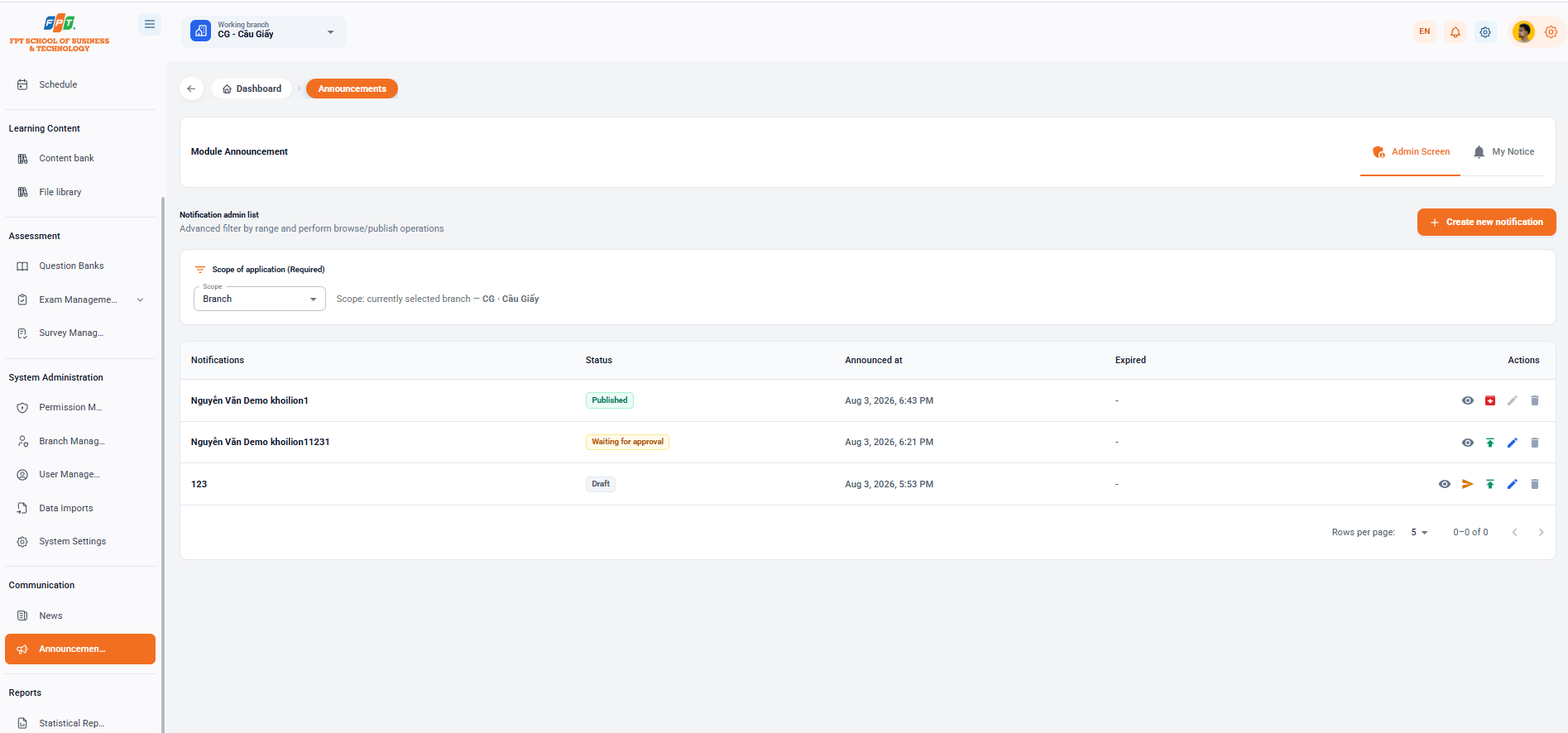
The Communication Management subdivision assists administrators in sending, censoring, and navigating system notifications to users at a branch or system-wide scale.
16.1. Notification Overview and View Modes
- Breadcrumb: General > Announcement
- Title of the decomposition: Module notification.
- Switch to view mode:
- Admin Screen: Interface for new administrators to create, browse and manage navigation notifications.
- My Notice: List of personal notifications that the admin account receives from the system.
- Functional button: Click the [+ Create new notifications] button (orange) in the upper right corner to set notifications to the user.
16.2. Scope
The administrator sets the notification range in the Applicable Range (Mandatory):
- Range: Dropdown selects the level of submission (e.g. Branch, Whole system...).
- Application branch: Displays selected current branch (e.g. Range: branch is selecting CG - Cau Giay).
16.3. Managed Notification List
The table summarizes the details of the initiated notifications and the release status:
| Notifications | The State | Announce the time | The deadline | Action |
|---|---|---|---|---|
| I'm not going to lie. | Published | 18:43 3 thg 8, 2026 | — | See / Cancel publish / Repair / Delete |
| This is my first time. | Wait for the approval. | 18:21 3 thg 8, 2026 | — | See / Exit / Repair / Remove |
| 123 | Draft | 17:53 3 thg 8, 2026 | — | See / Browse / Tap / Edit / Delete |
16.4. Notification Management Actions
- Eye icon (see): See the details of the content and the list of recipients.
- Paper Aircraft icon (Submit/Publish): Transfer the notification from the Copy status to the censorship or publication pending.
- Rounded Add-on icon (Full/Out): Delete the notification in Wait for the message to be sent to the user.
- Name Nose up (Snap): Place the notification in the priority position on the list of notifications of the recipient.
- Pen Tree icon (Correction): Modify the content, title, or display time of the notice.
- Trash (Remove) icon: Remove the notification from the system. The following is a section of the Guide to the Use of Statistical Reports (Warning section) compiled in sequence to the standard title format for Google Docs: