
File Library Teacher Guide
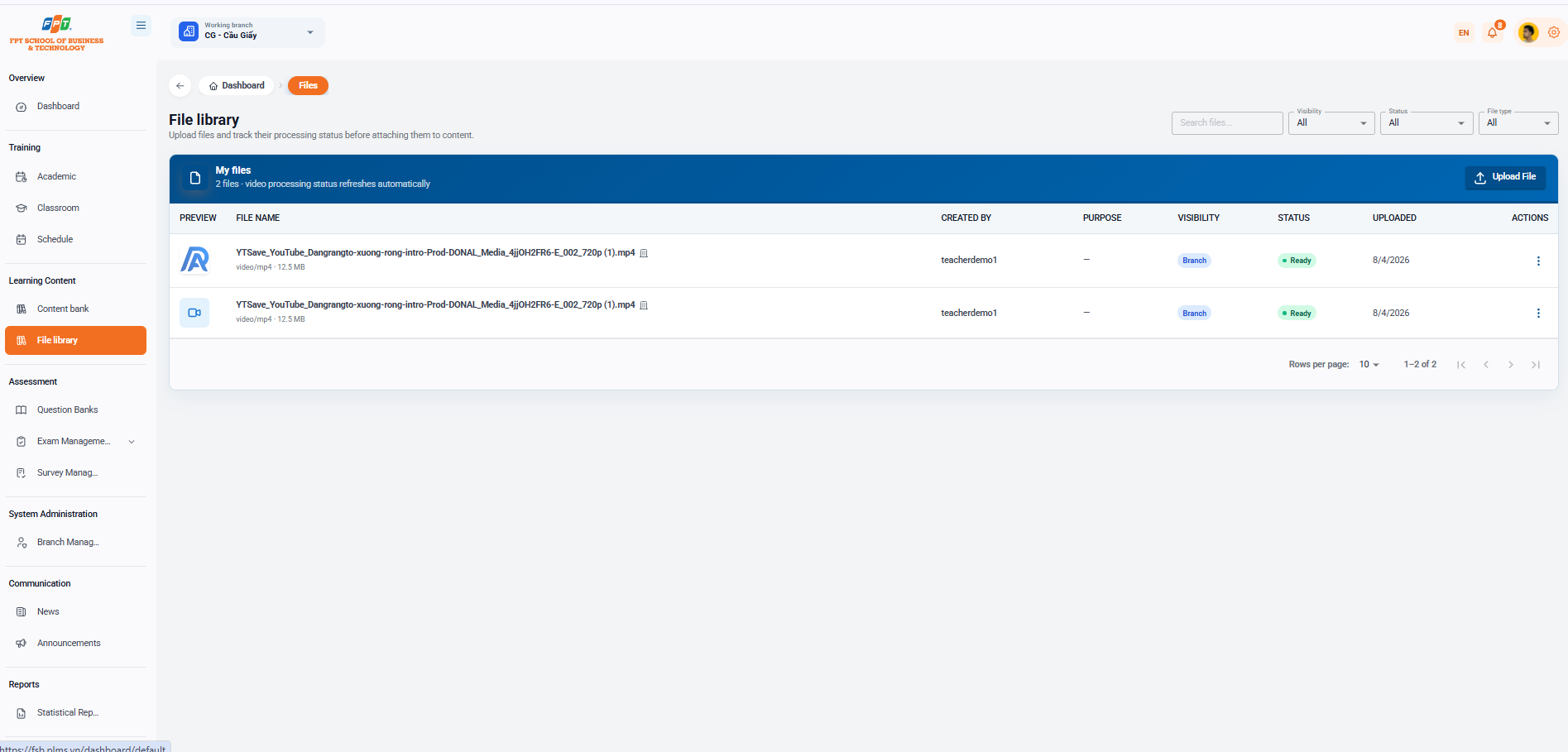
The File Library System of the Academic Interior category assists faculty to upload, store and track the status of media processing (video, documentation, SCORM...) before attaching them directly to lessons or to a library of learning materials.
6.1. Interface Overview
- Breadcrumb: Overview > File
- System Title: File Library (Upload and track file processing status before attaching to the content).
- My File: Displays the total number of files and automatic video processing status (e.g. 2 files · automatically updated video processing status).
- Download Activation: Click the [Download File] button (navy blue in the right corner of the header bar) to select and download new media files from the computer to the system.
6.2. File Search and Filters
Supporting filtering and quick file search tools:
- Search: Enter the search file name in the Search file box.
- Scope: Read files by access level (All, Branch...).
- Status: Following the file processing process.
- File type: According to the file format (All, Video, Document...).
6.3. Uploaded File List
The summary table manages the details of the files in the library (now there are 2 files):
| Let's see. | The file name. | The Creator | Purpose | The scope | The State | Loading date | The work |
|---|---|---|---|---|---|---|---|
| 📄 | YTSave_YouTube_Dangrangto-xuong-rong-intro-Prod-DONAL_Media_4jjOH2FR6-E_002_720p (1).mp4 (video/mp4 · 12.5 MB) | teacherdemo1 | — | Branches | Ready to go. | 4/8/2026 | ⋮ |
| 📹 | YTSave_YouTube_Dangrangto-xuong-rong-intro-Prod-DONAL_Media_4jjOH2FR6-E_002_720p (1).mp4 (video/mp4 · 12.5 MB) | teacherdemo1 | — | Branches | Ready to go. | 4/8/2026 | ⋮ |
6.4. File Actions
- Three-point icon (): Open the list of operation options for each file:
- View the file live.
- Stick the files to the lesson/school.
- Download the file to the computer.
- Delete the files from the library.
- Page layout: Support for customizing the number of lines displayed (defining 10 lines/line) and list navigation (12 over 2). The following is a documentary section of the Guide to Use Question bank compiled in sequence to the standard distributed title format for Google Docs: