
Role and Permission Management User Guide
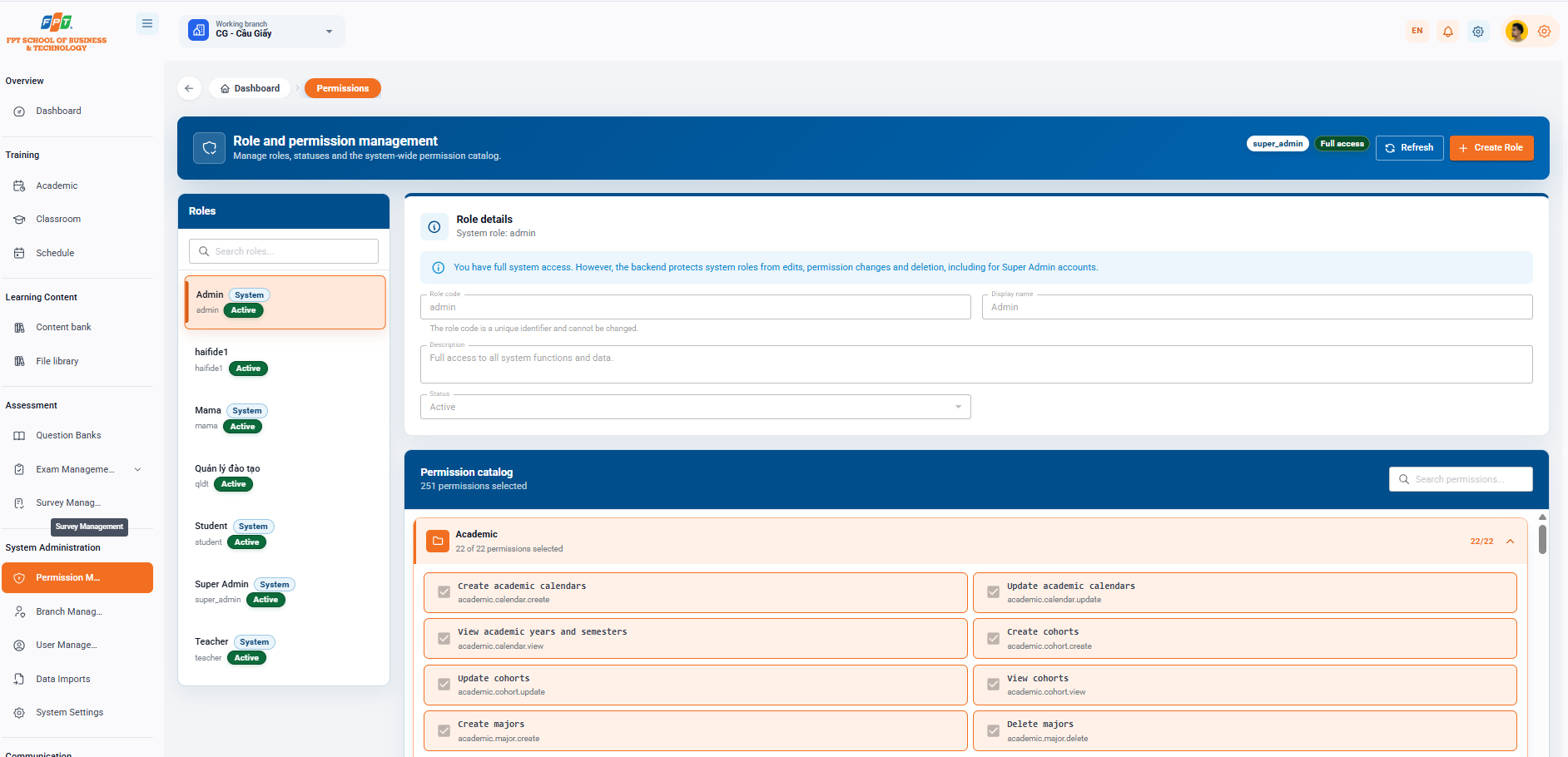
The Role Management and Delegation subset of the System Management subset supports the setup administrator, customizing the roles list and the detailed allocation (Catalog permission) applied throughout the system.
10.1. Role and Permission Management Overview
- Breadcrumb: General > Distribution of rights.
- System title: Role management and decentralization (Role management, status and catalog permission applicable throughout the system).
- Systemic action:
- User ID: super_admin - All the permissions.
- [Reloaded]: Updating all the configuration data.
- [+ Role creation]: Orange button in the upper right corner to initiate a new role.
10.2. Role List (Left Column)
Manage existing roles on the system that comes with the Quick Search Filter:
- Oh, look for a role in the cell.
- List of system roles: | My name is Role. | Role code | Classification | The State | | --- | --- | --- | --- | | Admin | admin | The system | Activated | | ha11de1 | ha11de1 | — | Activated | | Mama | mama | The system | Activated | | Training management | qldt | — | Activated | | Student | student | The system | Activated | | Super Admin | super_admin | The system | Activated | | Teacher | teacher | The system | Activated |
10.3. Role Configuration (Right Column)
10.3.1. Role Information
Allow users to view and update the basics of the selected role:
- Role code (*): Unique identifier code and cannot be changed after creation (e.g. ha11de1).
- Display name (*): The name of the role shown on the interface.
- Description: Information explains the details of the scope of the role.
- Status: Select the active state (Activity/Stop of operation).
- The operating button:
- [Remove]: Remove the role from the system.
- [Information storage]: Recognize changes in the role information block.
10.3.2. Permission Catalog
The aggregate manager lists the permissions granted to the role (showing the number of permissions selected, e.g. Selected 31 permissions):
- Oh search: Search for specific permissions in Search for permission...
- [Religion Note] button: Apply the list of privileges marked with the selected score for the role.
- Division of rights (e.g. Academic group - Selected 22 out of 22 rights): | Code / Name of the author | Describe the function | Choose | | --- | --- | --- | | Create calendar and semester academic.calendar.create | New calendar and semester | ☑ | | Update the Academic Year and Semester academic.calendar.update | Edit the calendar, the semester information | ☑ |
The following is a partial list of Guides to Use Branch Management (System Management) compiled in order to standardize the distributed title format for Google Docs: