
Reports and Analytics Teacher Guide
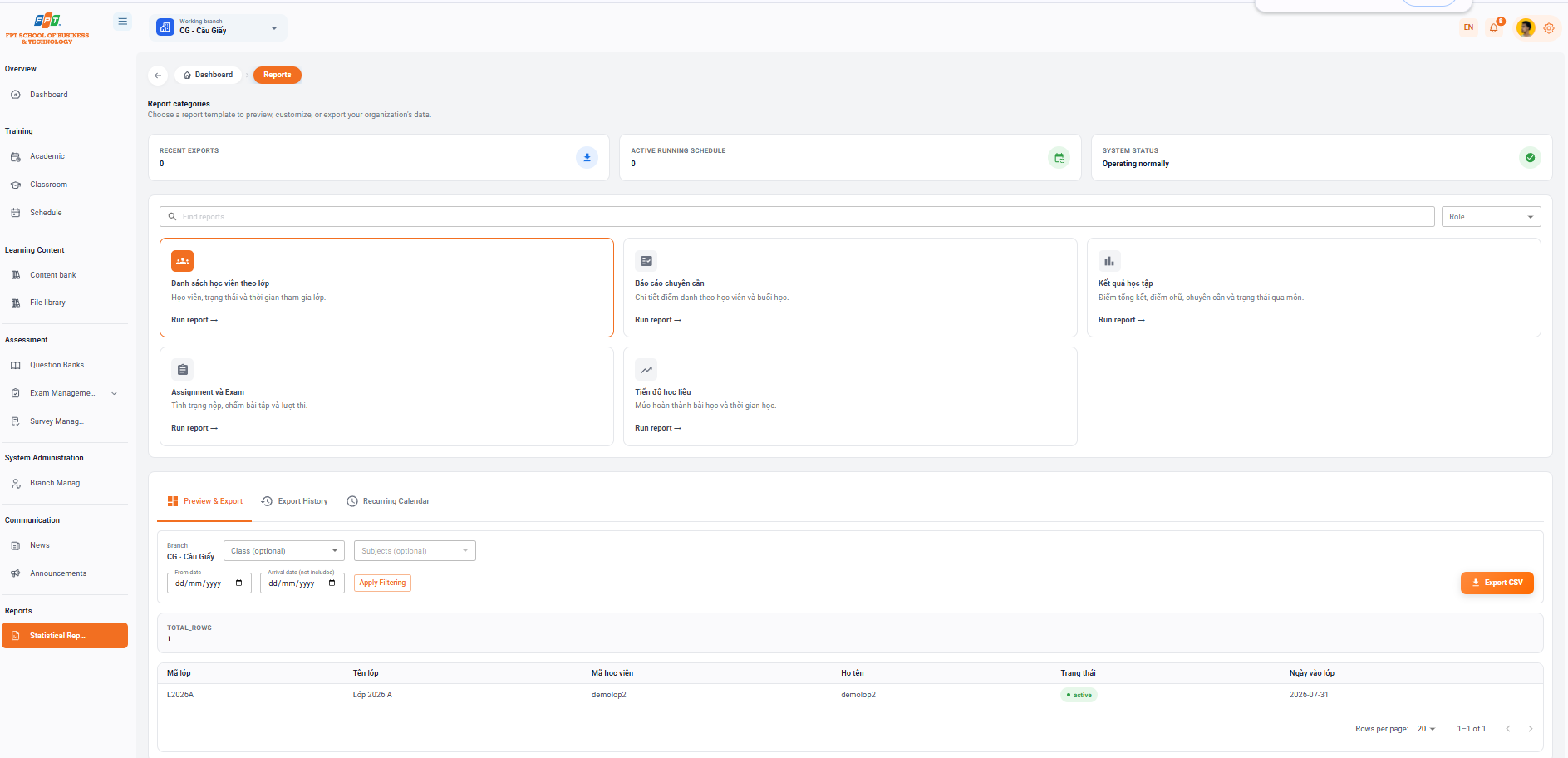
The Statistical Reporting System in the Newsletter category assists managers, faculty and staff to preview, customize, export data and set up an automatic reporting schedule for the organization.
12.1. Overview and System Metrics
- Breadcrumb: General > Reporting
- System headings: Report headings (Choose a report template to preview, customize or export the organization's data).
- The statistical indicator cards:
- Recent drop: 0 rounds.
- Calendar running: 0 calendar.
- System status: Good operation (green mark).
12.2. Report Template Catalog
The system provides five in-depth report templates for training management tasks (users click Run Report → on each tag to activate):
- List of students by class: Students, status and time of attendance (Selected).
- The report of the enrollment: Details of the student enrollment and the class.
- Academic results: Summary points, spelling points, qualifications and status through the course.
- Assignment and Exam: Status of submission, assignment and exam scores.
- Learning level: Level of completion of the lesson and time of study.
12.3. Previewing, Filtering, and Exporting Data
Report Filters
- Branch: CG - Cau Giay.
- Class: Select class from the dropdown.
- Lessons: Choose a subject from the dropdown.
- Time of day:
- From date: Select the start time (dd/mm/yyyy).
- Date of arrival (excluded): Select the expiry date (dd/mm/yyyy).
- Control button: Click [Directory] to view the data or [Exit CSV] (orange) to download the data to the machine.
Preview Table Results
- Total number of data streams (TOTAL_ROWS): 1 | Class code | Class name | Code of Practice | They're called | The State | Day of class | | --- | --- | --- | --- | --- | --- | | L2026A | Class 2026 A | demolop2 | demolop2 | active | 2026-07-31 |
12.4. Advanced Function Tabs
- History of output: Search for lists and status of previously output report files.
- Calendar: Automatically set to send reports by cycle (day/week/month) via email.